
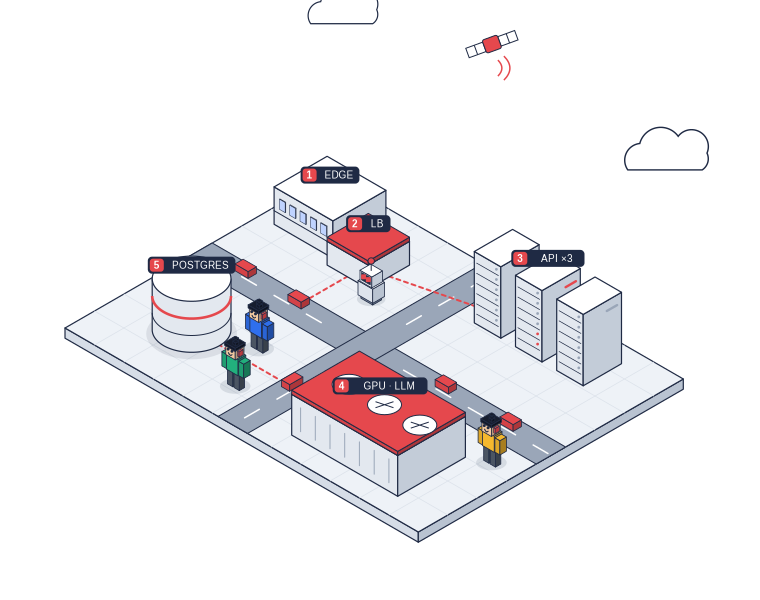
Most system-design interviews still ask about URL shorteners. Real teams are now asked something harder: “Put this LLM feature in front of a million users without going broke or falling over.” Here’s how I’d draw it, as a tiny city, one building at a time.
The five buildings
- Edge: TLS termination, caching of static assets, basic bot protection.
- Load balancer: spreads traffic across healthy API instances.
- API (×3): stateless services that authenticate, validate, build prompts and call the model.
- GPU · LLM, the inference layer: a hosted model API, your own GPU servers, or both.
- Postgres: users, conversations, usage records, and (with pgvector) embeddings for retrieval.
Nothing exotic. What makes it an *LLM* system is how each building handles slow, expensive, unpredictable requests.
What’s different about LLM traffic
A normal API call takes milliseconds and costs nothing. An LLM call can take 2–30 seconds, stream tokens, and cost real money per request. That changes the design:
- Long-lived connections. Streaming responses (server-sent events or WebSockets) mean your load balancer and API need generous timeouts and connection limits.
- Cost is a resource like CPU. You budget tokens per user the way you budget requests per second.
- Capacity is lumpy. A GPU serves a limited number of concurrent sequences; past that, latency explodes instead of degrading gently.
Rate limiting by tokens, not just requests
Request-per-minute limits aren’t enough when one request can be 50 tokens and the next 50,000. Track both:
limit:user:{id}:rpm     -> 60 requests / minute
limit:user:{id}:tpm     -> 40,000 tokens / minute
limit:org:{id}:daily    -> 2,000,000 tokens / day
Estimate input tokens before the call, charge output tokens after it, and reject early with a clear message when someone is over budget.
Queues for anything that can wait
Not everything needs an answer in two seconds. Summaries, batch classification and embedding backfills belong on a queue with workers that pull at the rate your GPUs (or your provider’s limits) can handle. The interactive path stays fast because the batch path never competes with it.
Fallbacks and timeouts
The model provider will have an outage on the day of your launch. Plan for it.
- Timeouts per stage: time-to-first-token and total time, separately.
- Retries with jitter, but only on safe, idempotent calls, and never retry a 429 immediately.
- Fallback models: a smaller or alternative model that keeps the feature working in a degraded mode.
- Circuit breakers so a failing dependency doesn’t take every API instance down with it.
Caching
Two caches pay for themselves quickly:
- Exact-match cache for identical prompts (common in classification and templated features).
- Retrieval cache for embeddings of popular queries and documents.
Semantic caching (reusing answers for *similar* prompts) can help too, but test it carefully: a wrong cached answer is worse than a slow right one.
Where Postgres fits
Postgres quietly does a lot: conversation history, usage metering for billing, audit logs for compliance, and vector search via pgvector for retrieval. One well-run database beats three specialised ones for most teams until scale proves otherwise.
Observability you’ll need on day one
For every model call, record: model name, input and output tokens, latency (time-to-first-token and total), cost, user or tenant, and outcome. Put a trace ID on the whole request so you can follow it from the edge to the GPU and back. If you’re coming from AI engineering rather than ops, this is the part that turns a prototype into a service: I wrote about the wider role in AI Engineer in Toronto.
FAQ
Should I self-host the model or use an API?
Start with a hosted API to learn your traffic shape. Self-host when you have steady volume, strict data-residency needs, or a model that fits comfortably on hardware you can operate.
How many GPUs do I need?
Measure, don’t guess: load-test with realistic prompt and output lengths, find the concurrency where latency stays within your target, and add headroom for spikes and failures.
Is a vector database required for RAG?
No. pgvector in Postgres is enough for many products, and it keeps your data in one place.