
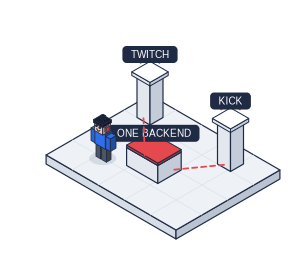
Plenty of streamers now go live on Twitch and Kick, and they want the same tools on both: a chat bot, alerts, a points game, an AI co-host. Developer content almost always covers one platform. Here is how the two actually differ, and how to build one backend that serves both.
Twitch: extensions plus APIs
Twitch has two building blocks:
- Extensions: web pages (HTML, CSS, JavaScript) that run inside the Twitch player or channel page as panels, overlays or components. They talk to your Extension Backend Service (EBS) using signed JWTs, and they go through Twitch review before public release.
- APIs and EventSub: the Helix API for data and actions, and EventSub for real-time events (follows, subscriptions, chat and more) delivered by webhook or WebSocket.
Kick: a public API and webhooks
Kick launched its public API in 2025 and has been adding to it since. There is no in-player extension surface like Twitch’s; you build apps that work through the API:
- OAuth 2.1 on
id.kick.com, with PKCE. App access tokens (client credentials) for public data, user access tokens for acting on a user’s behalf, with scopes. - REST endpoints for channels, livestreams, categories, chat (send, reply, delete), moderation, channel rewards and KICKs.
- Webhooks for events such as
chat.message.sent,channel.followed,channel.subscription.new,channel.reward.redemption.updated,livestream.status.updatedandkicks.gifted. Payloads are signed; verify them with Kick’s published public key.
Kick webhooks need a public HTTPS URL. During development, expose your local server with a tunnel such as Cloudflare Tunnel or ngrok.
One backend, two adapters
The trick is to keep platform details at the edges:
- Adapters per platform: Twitch (EventSub and Helix) and Kick (webhooks and REST) translate events into one internal format, for example
{platform, channel, user, type, text}. - One event bus (a queue or just a database table) that your features read from.
- Features (bot commands, alerts, points, an AI co-host) that never know which platform an event came from.
- Output adapters that send chat replies or actions back through the right API.
On Twitch you can add an extension front end on top; on Kick the same features appear in chat and on an overlay you load in OBS as a browser source.
Reliability for live events
Streams are live, so failures are public. A few SRE habits help:
- Idempotency: webhooks can be delivered more than once. Store event IDs and ignore duplicates.
- Acknowledge fast: return 2xx quickly and process in the background, or the platform may retry or disable your endpoint.
- Token refresh: refresh tokens before they expire and alert when a refresh fails.
- Rate limits: queue outgoing chat messages instead of sending them in a burst.
These are the same reliability ideas behind SLOs for LLM features, and if your tool uses an AI co-host, the guardrail thinking in LLM evals for engineers applies too.
FAQ
Does Kick have extensions like Twitch?
Not in the same in-player form. Kick offers a public API with OAuth 2.1, REST endpoints and webhooks, so tools are built as apps, bots and OBS overlays.
Can one bot work on both Twitch and Kick?
Yes. Write a small adapter per platform that converts events into one internal format, and keep all features platform-neutral.
How do I test Kick webhooks locally?
Run your server locally and expose it through a tunnel such as Cloudflare Tunnel or ngrok, then set that public URL as the webhook URL in your Kick app settings.